Renfrew-Collingwood Community News

News stories from the Renfrew-Collingwood community in East Vancouver


Leave a comment

Family tree tips for the new year: Storing and saving your family photos

NewYears1970-low

New Year’s Day, 1970: Loretta Houben (in the middle) with her two sisters and her dad.

BY LORETTA HOUBEN

Hopefully you had time during the busy Christmas season to look over a few of those old family photos you’ve stashed away in the closet. Maybe you shared your newfound passion with the older generation, and verified a name or two.

Older people love to reminisce about the past, which isn’t really that long ago. I urge you to do this while you have your grandparents and great aunts and great uncles around. I had an aunt who told me to do this with my Grandma way back in the 1990s. Fortunately my Grandma hand wrote on all her photos, but what if she hadn’t?

One of the best ways to preserve your valuable family photos is to scan each one into your computer. Scanners are now a great price, with many options available at your local Staples, Best Buy, London Drugs or any similar store. There are good ones available for under $100, and well worth the investment.

Once the scanner is hooked up to your computer, simply read the instructions and begin to scan and save each photo in the best resolution possible. If you scan at low resolution, your photo will be too small, and if you wish to view it later for details, alas, you won’t be able to.

I found this out the hard way when I scanned in a family photo (please see my article from December 2013) at a very low resolution, and now am unable to determine a specific clue due to the fuzziness of the image. Scanning takes time and commitment but is truly well worth it for yourself and future generations.

You will need to store the photos in files on your computer, so take time to label the folders using a system that makes sense to you, so you’re able to locate the photos at a later date. There are many ways to do this, as each computer program is different.

The fun part comes after the photos are saved. You can then share with other family members around the world, providing they have a computer too.

One of my favourite ways to do this is to upload my photos to Facebook. I make sure only family members are able to see them. I’ve created a family group on Facebook, and invited family members only. So far no one else has shared any photos, but I’m hopeful the idea will catch on!

There are also blogs. I use Blogger to upload my photos for free, new and old. Since I began in 2009, I’ve had a few relatives which I had lost track of contact me and reconnect, so this is very exciting indeed.

Family genealogy is currently one of the most popular hobbies, and people use the internet as a tool to search for family members. My mother’s maiden name is very unusual (Brutke) so when that name is entered into the search engines, my posts with old photos pop up immediately! I make sure to leave my email address on my blog so relatives can contact me.

Another fantastic site to post and keep your photos for free is Flickr.com. You can store hundreds of photos for no cost, so if something should happen to your computer, your mind can be at rest. Of course, the best option of all, once you’ve scanned in your precious photos, is to have two back-up devices: one that you keep, and one that you store off site, maybe at your in-law’s or parent’s home, or at work. These devices are now reasonably priced and small enough to carry easily.

Of course, after the scanning is complete, you should save and store your actual paper photos safely, too. I store mine in the sturdy cardboard boxes sold at Michael’s craft store. They have cardboard dividers that you can label and insert between photos so that you can section them in year order. One box can hold many photos, and it’s a convenient size and can stack well in a closet. They are often on sale for $2.50 each.

If you work on this project one night per week, in no time you will be finished, and you’ll experience a feeling of great accomplishment! Then you can return to searching for more names to add to that family tree.

The next installment will feature aspects of the 1921 Canadian census (a great genealogy tool), which was newly released to the public in the summer of 2013.

Loretta Houben looks forward to a new year getting deeper into genealogy research, and wishes all of you following these monthly series on family tree tips all the best for a successful year. First published in the January 2014 issue of the RCC News.

Copyright 2018 Renfrew-Collingwood Community News


Leave a comment

Family Tree Tips: Using Ancestry Library Edition at the Vancouver Public Library

BY LORETTA HOUBEN

The avid family tree researcher knows about ancestry.com or ancestry.ca. This is a powerful database with billions of genealogy documents stored online, accessible through an expensive membership unless purchased on sale. But are you aware that the ancestry site can be researched at your local library?
I attended a class to learn how to do this at the Collingwood Library in December 2018. Deanna from the Central Branch taught the hour and a half session. There were nine spots available, but only three people showed up that evening. We each were provided with a laptop to work with, and this made it easy to follow along as Deanna projected what she was doing onto a large screen.

Anyone with a library card can sign in to the computers available at the library. The Central Branch in downtown Vancouver has several computers with blue tags on top that can directly log into the Ancestry Library edition.

First you sign into Firefox, then add your library number and pin. Click the accept button, and then click on Digital Library, then choose Online Resources. Enter Ancestry Library Edition, then click on Find, then Access Now.

You will be able to search the census, vitals, military, immigration and quick links with member trees, birth, marriage and death records. Ancestry Library Edition includes most of the information found in a paid membership site, but the content is not exactly the same and some documentation might require paid membership to access. If you would like to know what databases are not included, the Central Branch has a printout for this, and other helpful printouts on tips for searching the Library Edition.

Deanna helped us navigate through some of the search pages by using the name John Smith. The class learned how to narrow down the different fields. For example, we explored the 1921 census for Canada. A map was shown under the search button, and we could click on it and narrow the search to a specific province.

When you discover a document you’d like to save, you can send the document home by email or add the information to a USB stick. I tried emailing and it was very easy to do.

The tips I learned were that if you do a broad or narrow search on names you will get a better result. Sometimes it’s difficult to find your ancestor’s name on a census, as the census takers often made up the surnames!

Another neat trick I learned was that the hammer and wrench tool on the side of an image means that if you click on it, you can print, download, rotate the image right or left, or flip horizontally!

Part of the database for the Ancestry Library Edition includes the 1851 to 1921 Census of Canada, US Border crossings from the US to Canada from 1908 to 1935, Canada City and Area Directories from 1819 to 1906, Canada Obituary Collection 1898 to 2015, Canada Ocean Arrivals 1919 to 1924 and Canadian Passenger Lists 1865 to 1935. To see the full list, pick up a printout at the Central Branch. The United Kingdom, England and Wales, Northern Ireland, Europe and the USA are also included.

To find out when the next Ancestry Library Edition class will be offered, search events on Vancouver Public Library online. The next one is Tuesday, January 15, 2019, at 6:30 pm until 8 pm.

I highly recommend taking a class. It will be like opening Pandora’s Box, and you will be surprised and delighted. You may also disappear down a rabbit hole or two for a few hours. Best of all, it’s free!

Loretta Houben is the author of the Family Tree Tips series published in the Renfrew-Collingwood Community News.

Copyright 2018 Renfrew-Collingwood Community News


Leave a comment

Family tree tips for digging further

BY LORETTA HOUBEN

Genealogy is one of my hobbies that has evolved into a passion over the past few years. I thought I had learned everything about research online, but recently I discovered something quite exciting that I’d like to share.

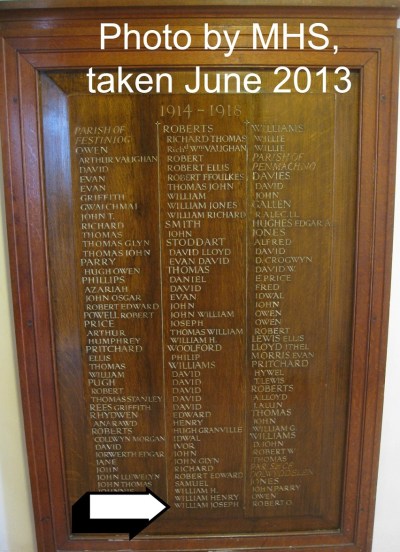
My great uncle William Joseph Williams died in World War I in Salonika, Greece, at age 24. Through the internet I was able to acquire a copy of his date of death, his Royal Welsh Fusilier badge number, the date he enlisted and went to France, and even a photo of his grave in Greece in the Karasouli Military Cemetery. I also tracked down his death notice in a Welsh newspaper, which was no mean feat!

I’d wondered for some time if his name had been included on a memorial in his hometown of Blaenau Ffestiniog in North Wales. My husband and I visited the town in May 2017 and checked out the only WWI memorial there but were met with disappointment. I nearly gave up in defeat, but a true genealogy detective is like a dog with a bone; you just can’t let go.

I enjoy a subscription to Family Tree UK Magazine in digital format. While checking out the latest edition a few months ago, I noticed that hovering my computer mouse over the links included in the articles and clicking would take me to the websites listed. I began poking around and I discovered a list of WWI memorials in Wales.

One thing led to another, and I double checked other things using Google and found photos of a WWI list of soldiers from Blaenau Ffestiniog in the local hospital. My great uncle’s name is on it! I nearly fell off my chair with this discovery.

Williams-Memorial-Plaque

Memorial plaque for WWI, parish of Blaenau Ffestiniog, Wales. Taken by MHS June 2013 from http://www.warmemorialsonline.org.uk

According to the website, three large wooden boards were placed in the hospital’s main corridor at the Blaenau Memorial Hospital on Wynne Road. I checked it out on Google maps and it’s located very close to where we stayed when we visited last year. If only we had known then, we might have been able to see the memorial in person.

However, the hospital is now closed permanently so I don’t know what will become of the memorial. My next mission is to somehow contact the hospital and make inquiries.

Don’t give up if you have a mystery in your family research. Remember that online technology has improved by leaps and bounds, and there are many helpful experts to assist you in your hunt, along with amazing tools.

Loretta Houben enjoys genealogy full time and subscribes to the Ancestry website. However, she often finds many clues for her family research by diligently using Google search and Google maps.

Copyright 2018 Renfrew-Collingwood Community News